 Saikat Roy
Louder
A tiny GNOME extension that boosts your speaker volume up to 300%, right from the Quick Settings menu. Free and open source, with a one-click on/off switch.
Overview
What it is
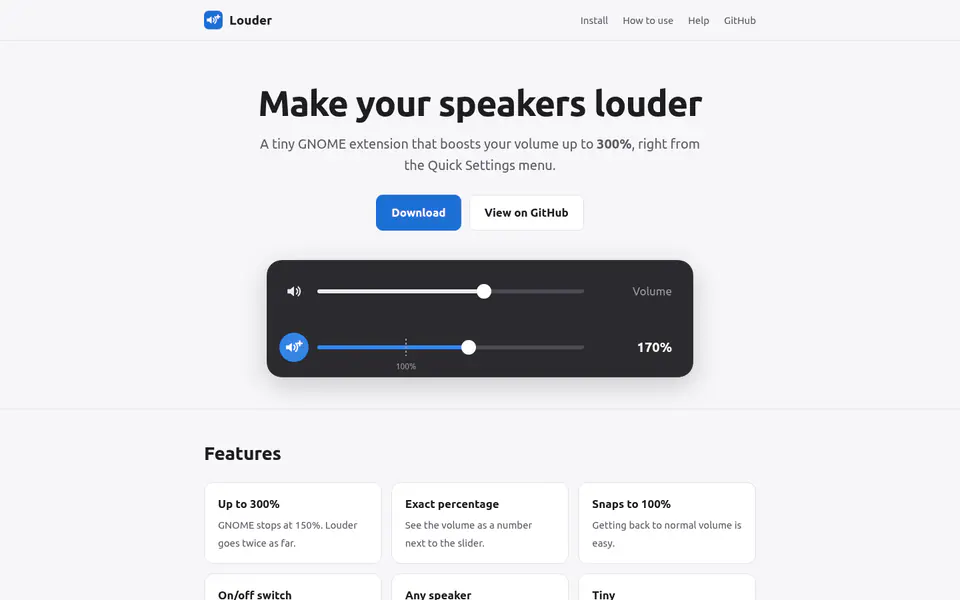
Louder is a free, open-source (GPL-2.0-or-later) GNOME Shell extension. GNOME's own volume slider stops at 150%; Louder adds a second slider to the Quick Settings menu, below the regular one, that goes up to 300% and shows the exact percentage.
Clicking the slider's speaker icon turns the boost on or off; with it off, both sliders stop at 100%. The choice is remembered across logouts, restarts and screen locks, it follows whichever speaker is active (built-in, Bluetooth, HDMI or USB), and it stays in sync with the volume keys and GNOME's own slider.
It's about 150 lines of plain JavaScript with no dependencies, using the same audio mixer as GNOME's slider, with PipeWire or PulseAudio amplifying the sound above 100%. It supports GNOME Shell 48, 49 and 50 (for example Ubuntu 25.04 or Fedora 42 and newer) and ships as a .deb for Ubuntu and Debian and a zip for any distribution.
Features
What it does
- Volume up to 300%, where GNOME's own slider stops at 150%
- Shows the exact percentage next to the slider
- Snaps to 100% when you drag near it, so getting back to normal is easy
- On/off switch on the slider's speaker icon; with the boost off, both sliders stop at 100%
- Remembers your choice after logging out, restarting or locking the screen
- Follows the active speaker: built-in, Bluetooth, HDMI or USB
- Stays in sync with the volume keys and GNOME's own volume slider
- Puts GNOME's over-amplification setting back as it was when turned off or removed
Built with
- JavaScript
- GNOME Shell extension
- GSettings
- PipeWire / PulseAudio
- GitHub Pages
More products by Saikat Roy
- HisabBD →
- Hottogol →
- BD Rail Ticket Alarm →
- Bangladesh Healthcare Search →
- Pujo Guide →
- BD Price Compare →
- Dimly →
- SuperV →
- SuperDot →
Want something built?
Tell me what you're building and I'll get back to you.